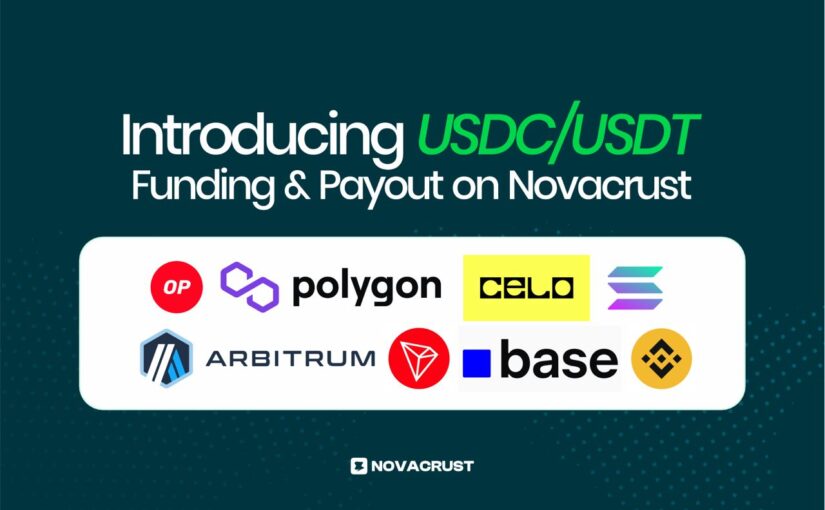
Introducing USDC/USDT Funding & Payout on Novacrust

Stablecoins power some of the most important features you use on Novacrust, such as USD Accounts, Virtual Cards, international payouts, and seamless conversions. Today, we’re excited to take that even further.

We’re officially rolling out full support for USDC and USDT, giving you a faster, more stable, and more flexible way to fund and use your Novacrust account. Whether you’re making routine transactions or managing high-value payments, stablecoins make the entire process smoother and more reliable.

What You Can Now Do

  1. Fund your USD Account with USDC/USDT: Instantly top up using stablecoins across multiple chains, including Solana, Celo, Optimism, Polygon, BNB Smart Chain, Tron, and more.
  2. Payout in Stablecoins: Withdraw or receive payments in USDC or USDT with speed and predictability.
  3. Save in Stablecoins: Hold value in USD-denominated assets without worrying about local currency fluctuations.
  4. Convert to Cash & Send to Local Accounts: Easily convert stablecoins to local currency and send to bank accounts or mobile money in supported countries.

To help you get started, here’s a quick guide on how to access and use USDC and USDT on Novacrust:

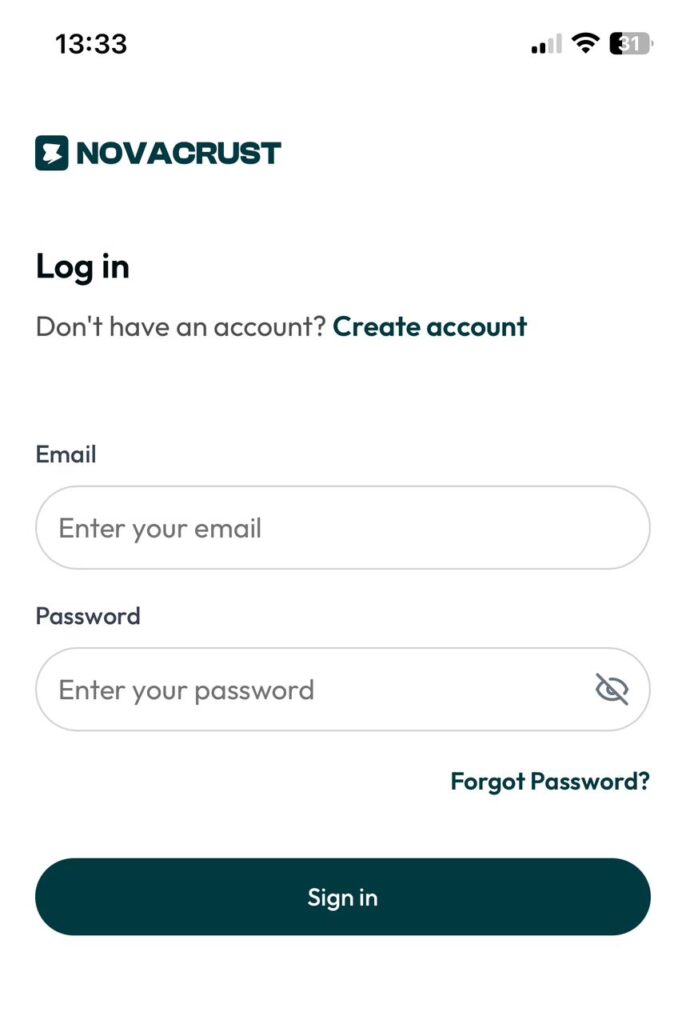
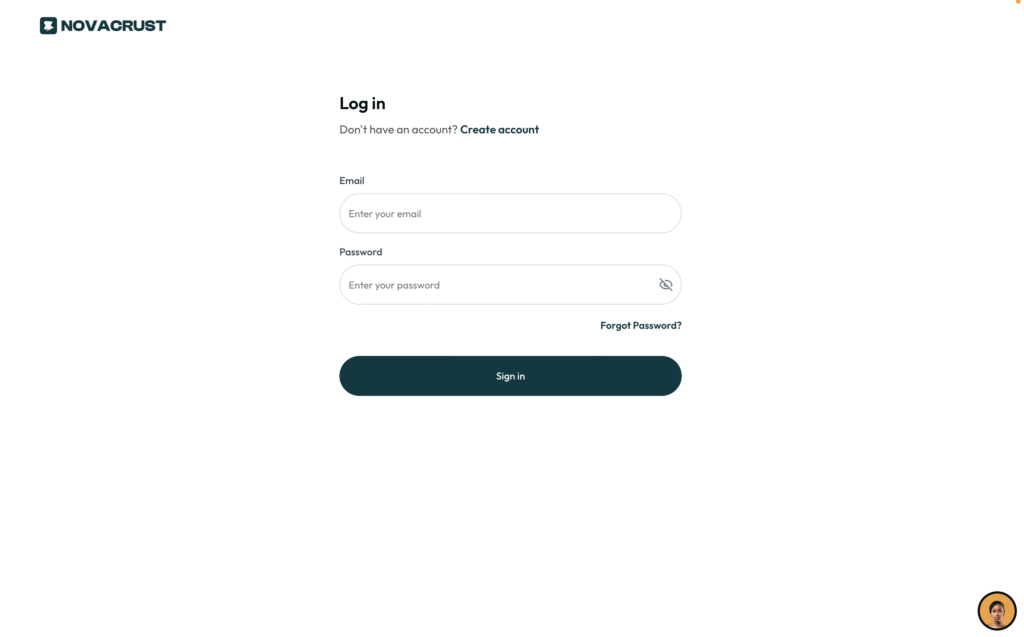
Step 1: Sign into your novacrust.com account.


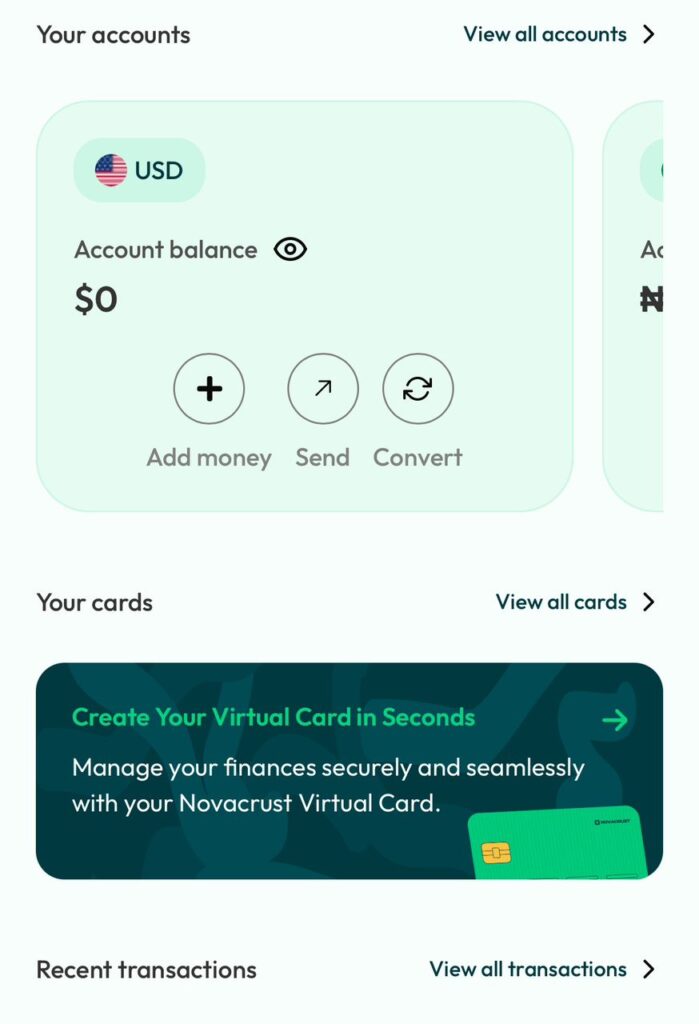
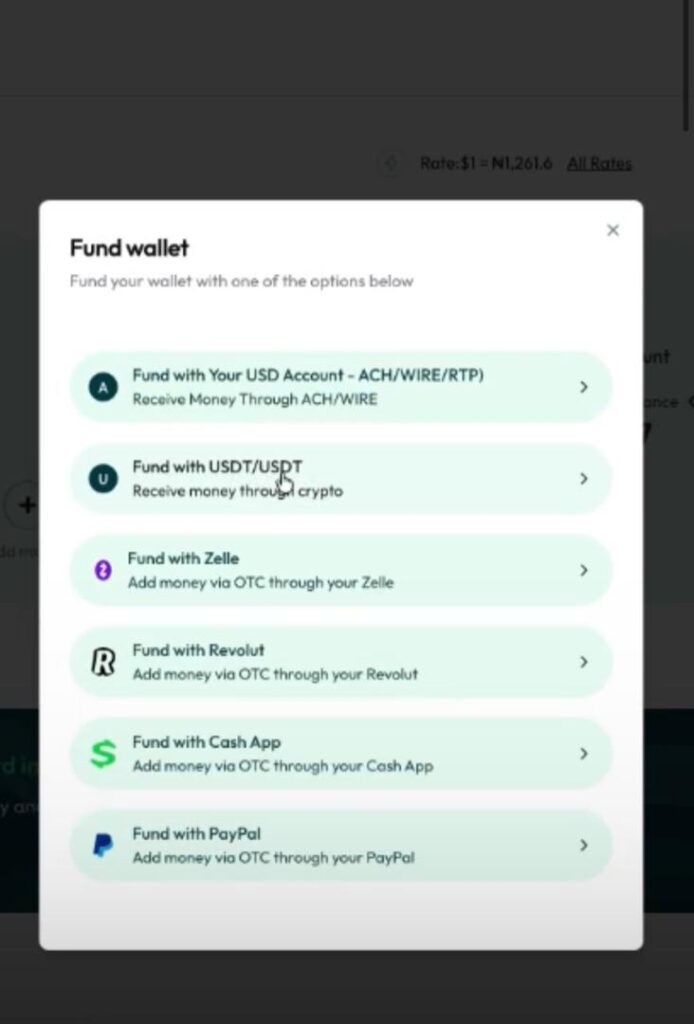
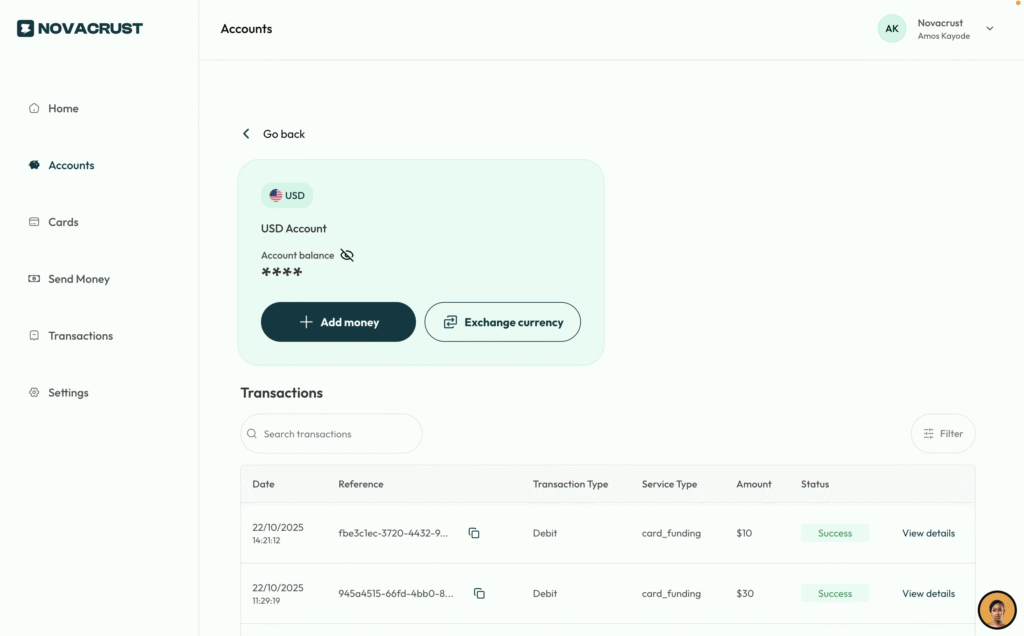
2. Go to your dashboard and click on Add Money.


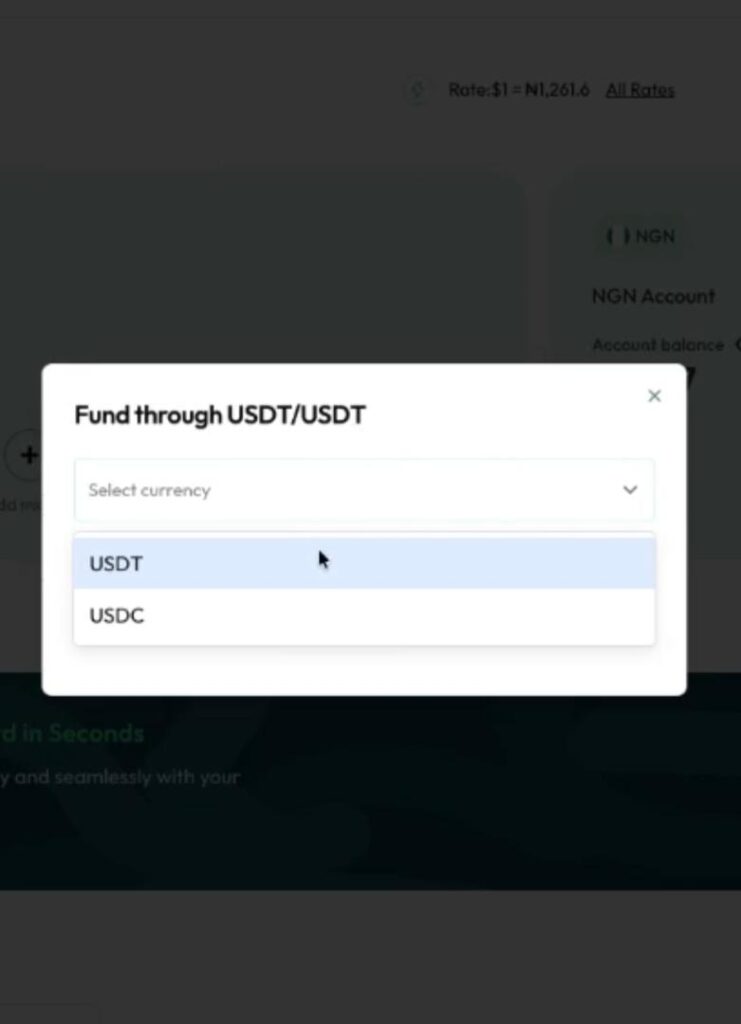
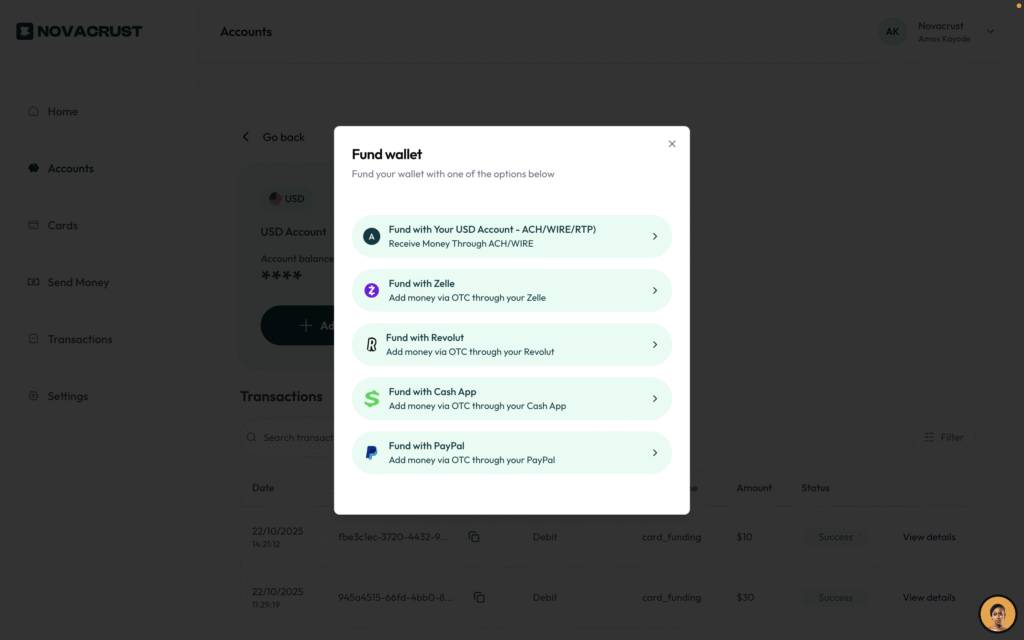
3. You’ll see various funding options, click on Fund through USDC/USDT.


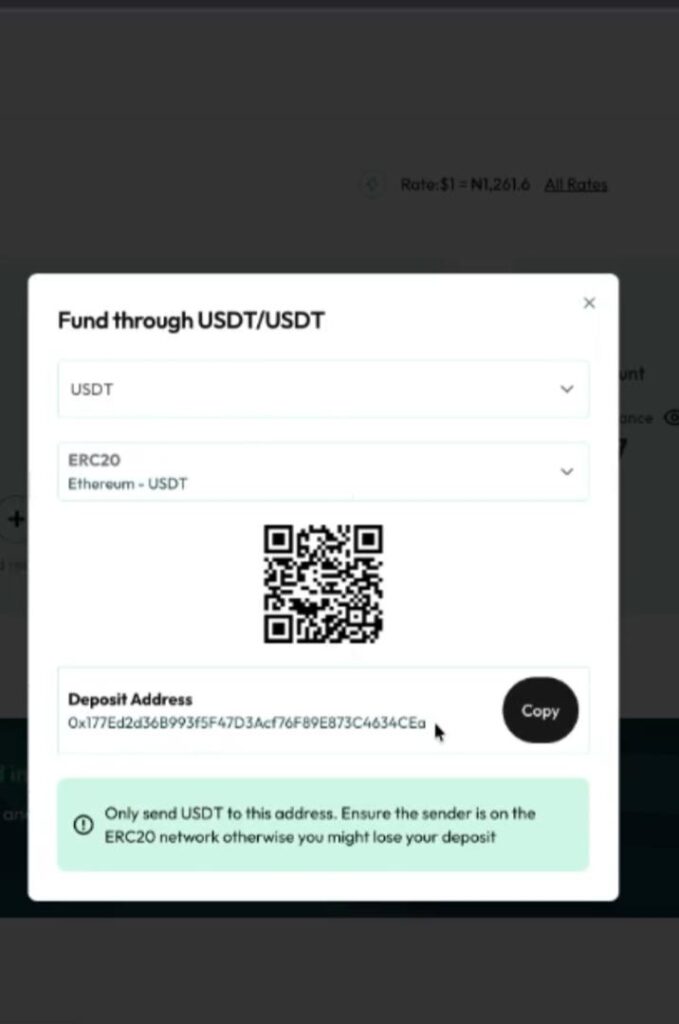
4. Select your preferred currency and network.


5. A QR code will appear along with your wallet address. Complete your payment, and your account will be funded!

Finally, as a Freelancer, creator, and entrepreneur, funding your Novacrust account with USDC or USDT is now seamless, secure, and fast.

Start transacting with stablecoins today on Novacrust! Sign up Now.

How Well Do You Know Your Subscription Prices? Prove it!

Join our weekly quiz every Friday and stand a chance to win $10

Sell Gift Cards for Crypto Instantly: The Fastest Way to Get Paid in USDT (2026 Guide)

Consumers reported $212 million in gift card scam losses to the Federal Trade Commission in 2024, and losses through the third quarter of 2025 were already tracking close behind. Most of that risk sits on the buying side of gift card trading: shady marketplaces, slow payouts, and cards that turn out to be empty. Selling is a different problem. If you have a card sitting unused, you want cash value out of it fast, and you want it paid out somewhere you actually control.

That is where crypto payout changes the math. Instead of waiting on a bank transfer or store credit, you can convert a gift card straight into USDT and hold, spend, or move it in minutes. Here is how it works, what determines your rate, and how to do it safely.

Why sell for crypto instead of cash

Cash payouts from gift card marketplaces usually route through a bank transfer, which means waiting one to three business days and staying inside whatever currency your bank account uses. A crypto payout skips that queue entirely.

  • Speed: USDT and USDC settle in minutes, not business days.
  • No bank dependency: useful if your bank is slow with inbound transfers, charges receiving fees, or you simply don’t want the naira, cedi, or shilling equivalent landing at today’s exchange rate.
  • Global reach: a crypto wallet works the same whether you’re in Lagos, Nairobi, or Manila. A bank payout does not.
  • Optionality: once it’s USDT or USDC, you can hold it, convert it, or spend it, instead of being stuck with a bank balance in one currency.

Gift card marketplaces typically price cards at 5% to 20% below face value, factoring in brand demand and the risk that a card has already been partially used. That discount applies whether you’re paid in cash or crypto. The advantage of crypto is entirely in what happens after the price is set: how fast you get paid and what you can do with it.

How to sell gift cards for USDT on Novacrust

  1. Open Sell Gift Cards on Novacrust and pick the brand: Amazon, Steam, iTunes, Google Play, Sephora, and dozens more.
  2. Upload the card details or a photo of the physical card. Novacrust verifies the balance before quoting a rate.
  3. Choose your payout: USDT, USDC, cash to your Novacrust USD Account, or your local bank. For crypto, pick the network (TRC20 keeps fees low).
  4. Confirm the rate and submit. Rates reflect brand demand that day. No guessing, no back-and-forth over WhatsApp.
  5. Get paid. Crypto payouts land in your Novacrust wallet in minutes once the card clears verification.

If you’d rather take cash directly, the full walkthrough for that path is in How to Sell Gift Cards Online Instantly for Cash. Crypto and cash payouts run through the same verification flow, so the only real decision is where the value lands.

What determines your rate

Three things move the number you get quoted:

  • Brand: Amazon and Steam trade close to face value because resale demand is high. Niche or regional cards trade at a steeper discount.
  • Card type: a physical card with a visible PIN generally verifies faster than an e-code, which affects how quickly you’re paid, not necessarily the rate itself.
  • Balance: partially used cards sell for a proportionally lower amount, since the marketplace can only verify what’s left.

Platforms that specialize in crypto-linked payouts, including Breet in the Nigerian market, compete mainly on how fast the payout lands and which networks they support. Novacrust’s edge is that gift cards, USDT and USDC funding, USD Accounts, and Virtual Cards all sit inside one account, so the crypto you receive from a card sale is immediately usable instead of parked in a separate app. Novacrust also supports Bitcoin, Solana, Ethereum, and more, so a card sale can fund whichever wallet you already use.

Staying safe when you sell

The FTC’s gift card fraud numbers are concentrated on the buying side (scammers pressuring victims to pay with gift cards), but sellers face a narrower risk: marketplaces that quote a rate, take the card, and then delay or shortchange the payout. Stick to three rules:

  • Only use a platform that verifies the balance before you hand over full card details.
  • Confirm the payout network (for USDT, that’s usually TRC20 or ERC20) before you submit, since sending to the wrong network can strand funds. Novacrust’s USDC/USDT funding and payout supports both.
  • Check that the quoted rate is locked at submission, not adjusted after the card is already verified.

Novacrust supports USDT, USDC, BTC, ETH, SOL, and more for payout, so if you’re already holding a preferred network from other transfers, gift card cash-outs can land in the same wallet.

FAQ

Can I sell any gift card for crypto?
Most major retail, e-commerce, and app store cards qualify. Rates vary by brand demand, so check the live rate on Sell Gift Cards before assuming a card isn’t eligible.

How fast does the crypto actually arrive?
Once your card passes verification, USDT and USDC payouts typically land in minutes. Verification time depends on card type: physical cards with a visible PIN usually clear faster than e-codes.

Is selling a gift card for crypto taxable?
Tax treatment depends on your country and how the proceeds are used. Novacrust isn’t a tax advisor, so check with a licensed professional in your jurisdiction if you’re unsure.

What if my card has already been partially used?
You can still sell it. The quote will reflect the remaining balance once Novacrust verifies it.

Turn unused cards into money you can actually use

A gift card sitting in your inbox is money you can’t spend where you need it. Selling it for USDT or USDC means you’re not waiting on a bank, and you’re not locked into one currency. Get Started. It’s free to list a card and see your rate.

The Best Apps to Buy and Sell USDT and USDC in Africa (2026)

Sell $500 of USDT through the wrong app, and you can lose $15 to $25 of it before the money even reaches your bank account. Not because the coin moved, but because of a widespread withdrawal fee, or a slow payout that forces you to accept a worse rate. Buying and selling stablecoins in Africa isn’t hard anymore. Picking the app that doesn’t quietly eat your money is the actual problem.

Here’s a straight comparison of the apps people across Nigeria, Kenya, Ghana, and beyond actually use for USDT and USDC, and what each one is genuinely good at a

Six rules for not losing money on your next crypto trade

  1. Check the spread, not just the “fee.” Many apps advertise 0% fees but bake their margin into the buy/sell rate. Compare the actual NGN, KES, or GHS amount you’d get, not the headline fee.
  2. Confirm your payout method is actually supported. Bank transfer, mobile money (M-Pesa, Airtel Money), and card funding aren’t universal across every app in every country.
  3. Check withdrawal speed before you need it. An app that takes a day to release your cash is a different product than one that pays out in minutes, even if the rate looks identical.
  4. Look for local licensing or clear regulatory standing. This matters more in Nigeria and Kenya than it used to, and it’s the difference between an app you can trust with rent money and one you use for small amounts only.
  5. Don’t ignore P2P if you’re trading larger amounts. Platforms with deep P2P liquidity (Binance, Bybit, Bitget) often beat dedicated apps on price once you’re moving a few hundred dollars or more.
  6. Test with a small trade first. Rates, speed, and support quality on paper don’t always match reality. A $20 test trade tells you more than any comparison table.

The apps, compared

Yellow Card

Pan-African coverage across more countries than most competitors, with strong local payment rails: bank transfer and mobile money in many markets. A solid default if you’re new to crypto and want one app that works whether you’re in Lagos or Nairobi.

Quidax and Busha

Both built specifically for the Nigerian market, with NGN rails and local support. Good if Nigeria is your only market and you want a straightforward buy/sell flow without needing P2P.

BitAfrika

Covers Ghana and Nigeria with a simple buy/sell/send flow across a wide range of coins, not just USDT and USDC. Worth a look if you want one app for stablecoins and other assets like BTC or ETH.

Binance P2P, Bybit, and Bitget

The deepest liquidity of any option here, with active P2P markets in Kenya, Ghana, and South Africa. Best for people comfortable navigating a P2P interface and trading larger amounts where price matters more than simplicity.

Novacrust

Buy, sell, and deposit USDT, USDC, BTC, ETH, and SOL directly on Novacrust, in the same app you’d use for a USD Account, gift cards, or sending money to 50+ countries. If you’re already moving money internationally, converting stablecoins in the same place you hold and spend it removes a step other apps can’t.

Which one should you actually use?

SituationBest fit
New to crypto, want simplicityYellow Card
Nigeria-only, straightforward buy/sellQuidax or Busha
Want stablecoins alongside other crypto and everyday finance in one appNovacrust
Trading larger amounts, comfortable with P2PBinance, Bybit, or Bitget
Ghana or Nigeria, want broad coin supportBitAfrika

FAQ

What’s the cheapest way to sell USDT in Africa?

It depends on the amount. For small trades, a dedicated app like Yellow Card or Novacrust with a tight spread usually beats P2P once you account for time and hassle. For larger amounts, deep P2P liquidity on Binance, Bybit, or Bitget often wins on price.

Is it safe to buy and sell USDT or USDC through these apps?

Stick to apps with clear regulatory standing in your country, visible company information, and a track record of fast payouts. Test any new app with a small trade before moving larger amounts through it.

Can I buy USDT or USDC with mobile money?

Yes, on most of the apps above, including Novacrust. Availability of mobile money as a funding method varies by country, so check before you commit to one app.

Do I need a separate wallet, or can I hold USDT in the app itself?

Most of these apps, Novacrust included, let you hold your stablecoins directly in-app rather than requiring a separate wallet. Useful if you want to convert, spend, or send without moving funds around first.

Buy and sell USDT, USDC, and more on Novacrust

Get Started. It’s Free. Then convert your crypto to cash, hold it, or spend it in the same app you already use for your USD Account and money transfers.

How to Buy USDT Safely in 2026: A Complete Guide for Emerging Markets

Search “buy USDT in Malawi” or “how to buy USDT in Maldives” and most of the first page isn’t a licensed exchange. It’s Telegram groups, Facebook posts, and P2P forums where you send money to a stranger first and hope the USDT shows up after. That gap between demand and safe supply is exactly why so many people in Cameroon, Zambia, Nepal, Botswana, and dozens of other markets still buy USDT the hard way.

USDT (Tether) is the most widely used stablecoin in the world, pegged 1:1 to the US dollar. That peg is the whole appeal: your money holds its value in dollars without you needing a US bank account. But “widely used” doesn’t mean “widely available through safe channels” everywhere. This guide covers how USDT actually gets bought and sold, where the real risk sits, and how to buy it in minutes instead of hours.

Why buying USDT is harder than it should be

In markets with limited USD liquidity, mainstream banks, weak local exchange infrastructure, or currency controls, three things usually happen:

  • Local exchanges either don’t exist or don’t support your country
  • Peer-to-peer (P2P) trading fills the gap, which means you’re trusting a stranger, not a platform
  • Rates vary wildly between sellers, and the “cheap” price sometimes hides a scam

None of that is a reason to avoid USDT. It’s a reason to be specific about how you buy it.

How the common USDT scams actually work

Most P2P USDT scams follow the same pattern: a seller offers a rate slightly better than everyone else’s, asks for payment via bank transfer or mobile money first, and then either sends less USDT than agreed, sends it to the wrong network, or disappears entirely. Group admins in Telegram or Facebook communities rarely offer any real recourse once that happens; you’re left with a screenshot and no way to reverse the transfer. This is the exact gap a licensed platform closes: your payment and the USDT release happen inside one system, not across two separate, unconnected steps.

Novacrust vs. P2P groups and other exchanges

Binance P2P, Busha, and Breet.io all let you buy USDT, and each works differently. Binance P2P connects you with individual traders directly, so you’re still trusting a stranger, just inside an app instead of a Telegram group. Busha and Breet.io operate as licensed exchanges in select markets, which is safer than open P2P, but neither pairs USDT buying with a USD Account or virtual card the way Novacrust does. If you want to buy USDT and also hold, spend, or convert dollars from the same wallet, that combination is where Novacrust differs most.

Six rules for buying USDT safely

  1. Use a platform that holds your funds in escrow, not a stranger’s word. If a seller asks you to pay first and “trust the process,” that’s not a platform, that’s a bet.
  2. Check the live rate before you commit. Rates can move within minutes. A platform that locks your rate for a short window protects you from last-second changes.
  3. Confirm the network before you send anything. USDT exists on multiple networks (TRC20, ERC20, and others). Sending to the wrong network address can mean losing your funds permanently.
  4. Avoid sellers who won’t verify their identity. Anonymity on your side is fine. Anonymity on the seller’s side, with no recourse if something goes wrong, isn’t.
  5. Start small the first time. Test any new platform or seller with a small amount before moving your full balance.
  6. Keep your funding trail traceable. Bank transfer or mobile money, not cash handoffs, so you have a record if a dispute comes up.

How to buy USDT on Novacrust

Novacrust lets you buy USDT (along with USDC, BTC, ETH, SOL, and more) directly, with the rate and network shown upfront before you confirm.

  1. Create your account. Sign up in a couple of minutes. No US address or SSN required.
  2. Fund your wallet. Pay via bank transfer, mobile money, or an existing crypto wallet.
  3. Buy USDT at the live rate. The rate you see is the rate you get, with no last-minute markup.
  4. Confirm the network. Novacrust shows you the correct network before you send, so your funds land in the right place the first time.
  5. Hold, spend, or convert. Keep it as USDT, convert to your local currency, or move it into your USD Account.

The whole flow runs on one platform, so there’s no handing money to a stranger and waiting to see what shows up.

Buying USDT in Malawi, Maldives, Cameroon, Zambia, Botswana, and Nepal

Country-specific USDT demand is real, and the friction looks similar everywhere: thin local exchange support, P2P groups filling the gap, and rates that shift depending on who you ask.

  • Malawi and Zambia: Local exchanges are limited, so most buyers rely on P2P sellers found through Telegram or Facebook, often paying via mobile money. A licensed platform removes the guesswork around whether the seller will actually deliver.
  • Maldives: Tourism-driven cash flow means many residents and workers want a stable way to hold dollars without going through a traditional bank. USDT fills that role, but only if the buying process is verified.
  • Cameroon: Mobile money is the dominant payment rail, and USDT buyers here need a platform that accepts it directly rather than routing through a third-party wallet first.
  • Botswana and Nepal: Both have smaller but growing USDT demand, usually from freelancers and remote workers who want to hold part of their income in dollars.

The country changes. The core problem doesn’t: buy from a platform that shows its rate and holds funds securely, not from a stranger’s word.

What buying USDT should actually cost

A fair USDT purchase has two costs: the network fee (small, fixed by the blockchain, not the seller) and the platform’s spread (the difference between the live market rate and what you’re quoted). Watch for sellers who bundle in a third, invisible cost: a marked-up rate disguised as a “discount.” If a rate looks meaningfully better than everyone else’s, ask why before you ask how.

USDT vs. other ways to hold dollars

If your goal is simply holding value in USD, USDT isn’t your only option. A Novacrust USD Account gives you a real US account number in your name, no crypto step required. Some people use both: USDT for speed and portability, a USD Account for a bank-like balance they can receive ACH and wire transfers into. Compare what you actually need before picking one.

FAQ

Is it legal to buy USDT in Malawi, Cameroon, Zambia, Botswana, Nepal, or the Maldives?
Rules vary by country and change over time, so check your local regulations. In most of these markets, buying and holding USDT through a licensed platform is legal; the risk is usually with unregulated P2P sellers, not the asset itself.

How long does it take to buy USDT?
On Novacrust, a purchase completes in minutes once your wallet is funded. P2P trades can take much longer, since you’re waiting on another person to respond and confirm.

Can I buy USDT with mobile money?
Yes, on Novacrust you can fund your wallet with mobile money in supported countries and buy USDT directly from that balance.

Is USDT the same as a US dollar?
No. USDT is a stablecoin designed to track the US dollar’s value 1:1, but it’s a crypto asset, not a bank deposit. It moves like crypto and settles fast, which is the main reason people use it instead of, or alongside, traditional banking.

What’s the minimum amount of USDT I can buy?
This depends on the platform. Novacrust supports small first purchases, so you can test the process before committing a larger amount.

Buy USDT without the guesswork

You shouldn’t have to trust a stranger’s screenshot to hold dollars. Buy USDT on Novacrust with a live rate, a verified network, and funds that move in minutes, not hours.

Get Started. It’s Free.

Best Virtual USD Card for Remote Workers and Freelancers in 2026

Most banks charge up to 3% in foreign transaction fees on every swipe you make outside your home country, then flag the same charge as suspicious and block it anyway. If you get paid from abroad and spend on tools billed in dollars, that combination, the fee and the decline, is the real cost of remote work that nobody puts in a job posting. A virtual USD card fixes both problems at once: it is issued in dollars, so foreign merchants stop seeing it as foreign, and it is built for the spending pattern remote workers actually have.

This guide breaks down what a good virtual USD card needs to do, compares the platforms remote workers and freelancers actually use in 2026, and shows where each one falls short for this specific job.

Why remote workers need a different kind of card

A local debit card is built for local spending. It expects you to buy groceries, pay rent, and swipe at a restaurant, all in your home currency, all inside your home country. The moment you subscribe to a US-billed tool, pay for ads on a platform that only charges in dollars, or book a flight from a country your bank has never seen you in, that card starts working against you.

Remote workers and freelancers need a card that assumes the opposite pattern: income in one currency, spending across a dozen merchants billing in a currency you may not hold locally, from a location that changes more than a typical customer’s. A virtual USD card, funded directly from what you earn, removes the conversion step, the decline risk, and the fee that a local card adds to every international charge.

What a bad card setup actually costs you

Run the math on a single month. A $50 ad platform charge, a $20 design tool subscription, and a $15 app store bill add up to $85, and a foreign transaction fee on top of a marked-up conversion rate can quietly take another $6 to $8 before you even count the decline that forces you to retry the payment on a different card, or the day it takes support to unblock your account. Multiply that across a year of subscriptions and client tools, and the “convenience” of using whatever card you already have becomes one of the most expensive habits in a remote worker’s budget. It’s a smaller version of the same mistake covered in our guide to money management for remote workers and digital nomads: the fee you don’t see costs more than the one you do.

What to look for in a virtual USD card

Not every “dollar card” does the same job. Before picking one, check it against five rules.

  • Instant issuance. You should get card details in minutes, not after a physical card ships across a border.
  • Funding flexibility. A card that only accepts a wire transfer isn’t built for freelancers. Look for one you can fund from a local bank transfer, a USD balance, or crypto you convert on the spot.
  • Global merchant acceptance. The card needs to work with the specific tools you use: ad platforms, SaaS subscriptions, app stores, and marketplaces that only bill in dollars.
  • Transparent fees. A card with no monthly fee but a poor exchange rate on funding still costs you money. Compare the full cost, not just the sticker price.
  • No US address or SSN required. If you’re outside the US, the card should not assume you have either.

Comparing virtual USD card options for remote workers in 2026

Here’s how the platforms freelancers and remote workers actually compare on those five rules.

Wise gives you a multi-currency debit card tied to balances you hold in its app, and its mid-market exchange rate is genuinely competitive. The catch for many remote workers outside the US, UK, and EU: opening a Wise account often still asks for proof of address in a supported country, and the card leans on physical delivery for full functionality rather than instant virtual issuance.

Payoneer is built around receiving payments from marketplaces and platforms like Upwork or Amazon, and it issues a card against that balance. It’s a reasonable fit if your income already flows through Payoneer’s partner platforms, but it’s less useful if your clients pay by direct invoice or bank transfer, and withdrawal and card-loading fees can chip away at a freelancer’s margin.

Revolut issues virtual cards quickly and supports multiple currencies, but full features and higher limits sit behind a paid plan, and account opening is still restricted to a specific list of countries. If you’re not in one of them, Revolut isn’t an option no matter how good the card looks on paper.

Grey built its name specifically around freelancers and remote workers in Africa needing a USD account and card without a US address, and its dollar card is a genuine option in that market. It’s a strong comparison point for anyone weighing Novacrust against Africa-focused fintechs specifically.

Where Novacrust’s Virtual USD Card fits

Novacrust issues a Virtual USD Card instantly, no US address or SSN required, and funds it from your local currency, your USD Account balance, or crypto you convert in the same app. That last part matters if you get paid in USDT or USDC directly from international clients or platforms: you don’t need a separate wallet, a separate exchange, and a separate card provider. It’s one balance you can receive into, hold, spend from, and send home, without stitching four services together to do the job one should.

Your Novacrust card works with the tools remote work actually requires: ad platforms, SaaS subscriptions, app store billing, and marketplaces that only charge in dollars, at a transparent rate you can check before you fund it. If you’re weighing a card on its own against a full USD Account for freelancers, the short version is that you don’t have to choose. Both come from the same balance.

Frequently asked questions

What is the best virtual USD card for remote workers in 2026?

The best option depends on where you’re based and how you get paid. If you need instant issuance, no US address requirement, and the ability to fund from local currency or crypto, Novacrust’s Virtual USD Card is built for exactly that setup.

Can I get a USD virtual card without a US address or SSN?

Yes. Novacrust issues a Virtual USD Card to freelancers and remote workers outside the US without requiring a US address or Social Security Number.

Why does my local debit card get declined for international subscriptions?

Banks often flag charges from foreign merchants as suspicious, especially recurring ones billed in a currency you don’t hold locally. A card issued directly in USD avoids that flag because the merchant no longer sees it as a foreign transaction.

How fast can I get a virtual USD card as a freelancer?

With Novacrust, your Virtual USD Card is issued instantly in the app. No physical shipping, no waiting period before you can start spending.

Can I fund a virtual USD card with crypto?

Yes, with Novacrust. Convert USDT, USDC, or other crypto you’re paid in directly to your card balance in the same app, without routing through a separate exchange first.

Is a virtual USD card better than Wise or Payoneer for freelancers?

It depends on how you get paid and where you’re based. Wise suits freelancers already inside its supported countries who want a mid-market rate. Payoneer suits freelancers paid through its partner marketplaces. If you want instant issuance with no US address requirement and the option to fund from crypto or local currency, Novacrust is built for that specific case.

Get a Virtual USD Card built for how remote workers actually get paid. Get Started. It’s Free.

How to Receive Gumroad Payouts Outside the US (Without Losing Money to Fees)

Gumroad does not let you add a payout method if your country is not on its supported list, and that list leaves out most of Africa, plus large parts of Asia and Latin America. Creators in Nigeria, Kenya, Ghana, Pakistan, and dozens of other countries hit the same wall: sales pile up in their Gumroad balance with nowhere to send them.

The usual workaround, routing payouts through a US-based friend’s PayPal or a forwarding service, costs 3 to 8 percent in fees and conversion spread on every payout. On a $500 month, that is $15 to $40 gone before the money even reaches you.

Why Gumroad payouts fail for so many creators

Per Gumroad’s own payout documentation, Gumroad pays out two ways: PayPal, or direct deposit to a US bank account. PayPal is only available in a limited set of countries, and even where it works, PayPal’s own conversion rates run 3 to 4 percent above the mid-market rate. Direct deposit needs a real US bank account with a routing and account number, which is exactly what most creators outside the US do not have.

That second option, direct deposit, is actually the cheaper and faster path. You just need the US account to plug into it.

The fix: a USD Account with a real routing number

A Novacrust USD Account gives you a US account number and routing number you can add directly to Gumroad’s payout settings, the same way a creator living in Ohio would. Gumroad pays out via ACH straight into your account. No PayPal, no forwarding service, no friend holding your money. If you want the mechanics of how ACH payouts actually work, see ACH vs Wire vs SWIFT.

Here is the setup:

  1. Create a Novacrust account and open a USD Account. It takes minutes and needs no US address or Social Security number.
  2. Copy your account and routing number from your Novacrust dashboard.
  3. In Gumroad, go to Settings, then Payments, and add your Novacrust USD Account as a bank payout method.
  4. Set your payout schedule. Gumroad sends funds via ACH, which typically lands in 1 to 3 business days.

Once your dollars land, spend them with a Novacrust USD Virtual Card, convert to naira, cedis, shillings, or another local currency at competitive rates, or send to 50+ countries. You keep the payout in dollars for as long as you want and move it only when you are ready.

It is not just Gumroad

The same routing and account number works for any platform that pays out via US direct deposit or ACH: Upwork, Fiverr, Patreon, Payhip, Podia, and most US-based marketplaces and ad networks. Set it up once on your Novacrust USD Account, and you can add it as a payout method everywhere you get paid. This is the same setup covered in our guide to the US banking system for non-residents, if you want the fuller picture of how a US account number works without a US address.

This is the difference between chasing a payout workaround for every platform and having one dollar account that plugs into all of them.

What this actually saves you

A creator earning $800 a month through Gumroad, routing payouts through PayPal or a forwarding service at a 5 percent blended cost, loses about $40 a month, or $480 a year. Routing the same $800 through a USD Account cuts that to Novacrust’s standard conversion rate, only charged when you actually convert to local currency, and only on the portion you convert.

FAQ

Can I add a Novacrust USD Account to Gumroad if I do not live in the US?
Yes. The USD Account comes with a real US account and routing number that works in Gumroad’s bank payout settings regardless of where you live.

How long does a Gumroad payout take once I switch to direct deposit?
Gumroad sends ACH payouts on your chosen schedule, and funds typically arrive in your Novacrust USD Account within 1 to 3 business days.

Do I need a US address or Social Security number to open a USD Account?
No. Novacrust’s USD Account is built for freelancers and creators outside the US and does not require either.

Can I use the same USD Account for Upwork, Fiverr, or Patreon payouts?
Yes. Any platform that supports US bank direct deposit or ACH can pay out to the same Novacrust USD Account.

What can I do with the dollars once they land?
Hold them in USD, spend them with a Novacrust USD Virtual Card, convert to your local currency at competitive rates, or send to 50+ countries.

Stop losing 5 percent of every Gumroad payout to a workaround. Get Started. It’s Free. Open your Novacrust USD Account in minutes and add it as your payout method today.

How to Send Money to Ethiopia From Abroad (2026 Guide)

The World Bank’s Remittance Prices Worldwide data puts the average cost of sending money to Sub-Saharan Africa at over 7 percent of the transfer, among the highest remittance fees anywhere in the world. Send $500 to Ethiopia through the wrong channel and $35 or more never reaches your recipient. It disappears into a wire fee, a bad exchange rate, or both.

Ethiopia adds its own wrinkle: birr access is tightly controlled, and not every international transfer service pays out directly to a bank account or Telebirr wallet inside the country. This guide covers what actually determines the cost of sending money to Ethiopia, which payout method gets your recipient paid fastest, and how the process works on Novacrust.

Why Sending Money to Ethiopia Costs More Than It Should

Three things drive up the cost of a transfer to Ethiopia specifically: a marked-up exchange rate instead of the real one, a payout network that routes through a correspondent bank before it reaches Ethiopia, and a fee structure that hides part of its cut inside the rate instead of the receipt.

Traditional bank wires are usually the worst offender. A wire from a US or UK bank to Ethiopia can take 3 to 5 business days and cost $25 to $45 in fees before the exchange rate markup is even factored in. Western Union and similar cash-pickup services move faster, but the rate they quote is rarely the mid-market rate, and that gap is where a chunk of your money goes. For a broader look at how transfer costs stack up across methods, see our guide to the best way to send money internationally.

Five Rules for Sending Money to Ethiopia Without Losing Value

  1. Check the live exchange rate before you send. A transfer that looks cheap on fees alone can still cost more than a competitor with a better birr rate. Compare the total amount your recipient gets, not the fee line item.
  2. Confirm the payout method before you commit. Bank deposit to Commercial Bank of Ethiopia, Awash, or Dashen works for most recipients. Telebirr mobile money is faster for recipients without a bank account nearby.
  3. Avoid services that route through multiple correspondent banks. Every extra bank in the chain adds a day and a fee. A platform that pays out directly moves faster and costs less. This is the same routing problem we cover in ACH vs Wire vs SWIFT.
  4. Send in local currency terms your recipient understands. Confirm the birr amount landing on their end, not just the dollar or pound amount you’re sending.
  5. Keep the confirmation. A transfer reference number and payout confirmation are the only things that help if a transfer is delayed on the Ethiopian side.

How to Send Money to Ethiopia on Novacrust in 4 Steps

Step 1: Sign in and select your destination

Sign in to your novacrust.com account, tap Send Money, and choose Ethiopia from the list of 50+ supported countries.

Step 2: Choose bank deposit or Telebirr

Enter your recipient’s bank details or Telebirr mobile number. Both payout options are supported.

Step 3: Confirm the rate and amount

Novacrust shows you the exact birr amount your recipient gets, at the live rate, before you confirm anything.

Step 4: Send

Once you confirm, the transfer is on its way. Most transfers to Ethiopia land within minutes, not days.

Novacrust vs Other Ways to Send Money to Ethiopia

Bank wire Western Union Novacrust
Speed 3-5 business days Minutes to hours for cash pickup Minutes, straight to bank or Telebirr
Rate visibility Often unclear until it lands Marked-up rate, shown late Live rate shown before you send
Fees $25-$45 plus markup Flat fee plus rate markup Transparent fee, shown upfront
Payout options Bank only Mostly cash pickup Bank deposit or Telebirr

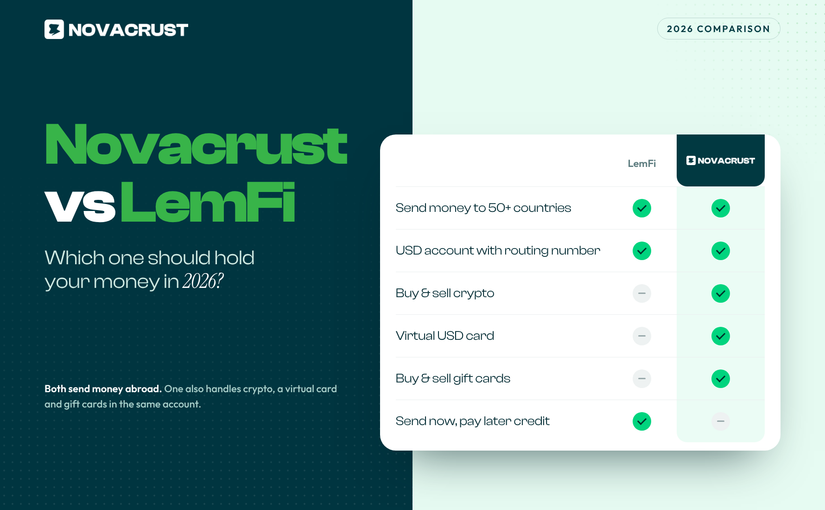
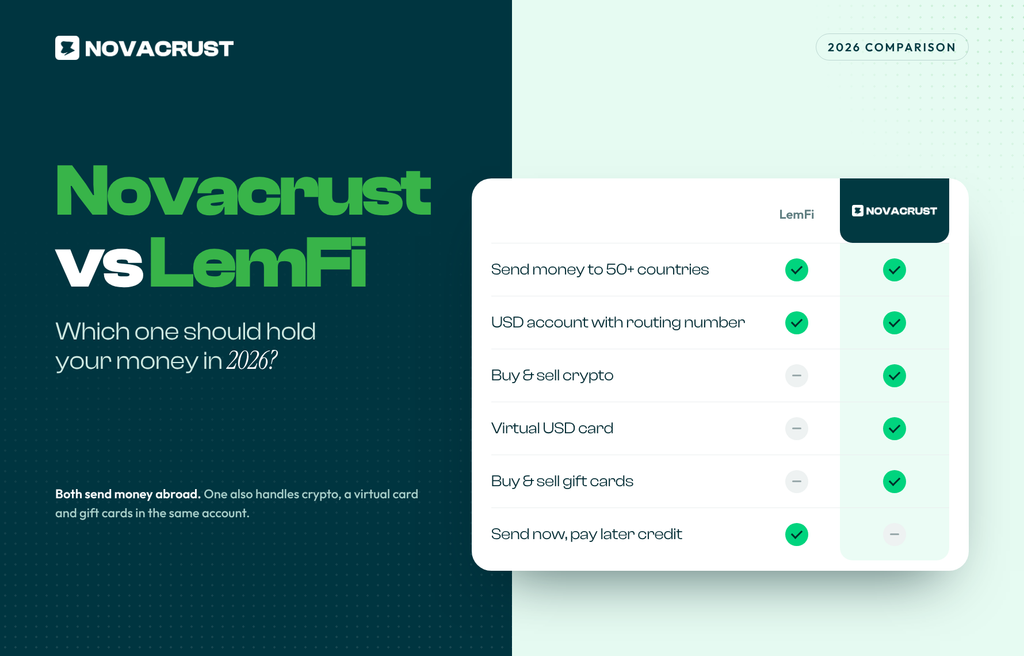
Lemfi is a reasonable option for sending to Ethiopia too, with its own dedicated transfer corridor. What changes the decision is what else you can do with your money afterward. On Novacrust, the same account handles crypto, a USD Account, Gift Cards, and a virtual dollar card, not just this one transfer corridor.

Frequently Asked Questions

How long does it take to send money to Ethiopia?
On Novacrust, most transfers land within minutes. A traditional bank wire can take 3 to 5 business days.

Can I send money to a Telebirr wallet directly?
Yes. Novacrust supports payout directly to Telebirr, alongside bank deposit to major Ethiopian banks.

What’s the cheapest way to send money to Ethiopia?
The cheapest option is the one where the total birr amount landing with your recipient is highest, after fees and exchange rate. Always compare that number directly, not just the advertised fee.

Do I need a Telebirr account or Ethiopian bank account to receive money?
Your recipient needs either a Telebirr wallet or an account at a supported Ethiopian bank. Novacrust pays out to both.

The Bottom Line

Sending money to Ethiopia doesn’t have to cost 7 percent of every transfer or take a week to land. A platform that shows you the real rate upfront and pays out directly to a bank account or Telebirr wallet gets your money there faster, for less.

Send money to Ethiopia on Novacrust. Get Started. It’s Free.

Sell Gift Cards for Crypto Instantly (2026 Guide)

Selling a gift card for crypto usually takes two trades, not one

Here’s the part nobody explains upfront: selling a gift card for crypto almost always means two separate trades. First you sell the card for cash on a gift card platform. Then you move that cash to a crypto exchange or a P2P trader and buy USDT, BTC, or whatever you actually wanted. Two platforms, two waiting periods, two sets of fees, and two chances for something to stall.

Crypto-focused platforms like Breet handle the second half well but don’t take gift cards directly. Gift card platforms like Cardtonic, Prestmit, and GC Buying handle the first half well but pay out in cash or local currency, not crypto. You’re stuck stitching two services together to do one thing.

How it works on Novacrust: one flow, not two

On Novacrust, selling a gift card and converting to crypto is a single flow:

  • Submit your card: Enter the card details or upload a photo of the card and receipt.
  • Get an instant valuation: See exactly what you’ll receive before you confirm anything.
  • Get approved: Most cards are verified and approved within minutes.
  • Choose crypto or cash: Convert your proceeds straight to USDT, USDC, BTC, ETH, SOL, and more, or keep it as cash in your Novacrust wallet.

There’s no second login, no separate exchange, and no waiting for a P2P trader to confirm. Your gift card balance becomes crypto in your Novacrust wallet, ready to hold, convert again, or send to 50+ countries. This builds on the gift card conversion and USDC/USDT funding and payout features already live on Novacrust.

Supported gift cards

Novacrust accepts Amazon, iTunes, Google Play, and more, with new brands added regularly. If you’re not sure your card qualifies, the app shows you a valuation before you commit, so there’s no guessing.

How Novacrust prices your card

Gift card rates move with demand, brand, and card value, the same way currency rates do. What makes the difference is transparency. Novacrust shows you the rate and the exact payout before you confirm the sale. That matters because the most common way people lose money on gift card sales isn’t a scam, it’s a platform that buries its margin until after you’ve already handed over the code.

Novacrust vs. selling gift cards through P2P forums

P2P forums and Telegram groups can get you a fast trade, but you’re relying on a stranger to actually pay once you’ve sent the code. If they don’t, there’s no support team to call. Novacrust removes the counterparty risk: you’re trading with Novacrust directly, not a stranger, and the payout lands in your wallet the moment your card is approved.

Keeping the trade safe

  • Never share the code before approval. Legitimate platforms verify the card first and pay you after, not before.
  • Check the rate before you commit. A rate that’s far above everyone else’s is usually a sign something’s off.
  • Keep your receipt. It speeds up verification if a platform asks for proof of purchase.
  • Convert or cash out right away. Once your gift card becomes crypto or cash in your wallet, you decide what happens next: hold it, spend it on your Novacrust Virtual Card, or send it to a bank account or mobile money wallet.

Prefer cash over crypto? The same instant valuation and approval flow works for straight cash payouts too. See our guide to selling gift cards online instantly for cash.

FAQ

Can I sell a gift card directly for crypto instead of cash?
Yes. On Novacrust, you choose whether your gift card payout lands as cash in your wallet or converts straight to USDT, USDC, BTC, ETH, or SOL. There’s no need to cash out on one platform and buy crypto on another.

How long does it take to sell a gift card for crypto?
Most cards are valued instantly and approved within minutes. Once approved, the crypto conversion happens immediately in your wallet.

What gift card brands does Novacrust accept?
Amazon, iTunes, Google Play, and more, with additional brands added regularly. The app shows you a valuation before you commit, so you’ll know upfront if your card qualifies.

Is it safe to sell gift cards for crypto online?
It’s safe when you use a platform that verifies the card and shows you the payout before you send any codes. Avoid P2P trades with strangers where there’s no recourse if they don’t pay.

Turn your gift card into crypto in one step

Stop trading gift cards for cash on one app and crypto on another. On Novacrust, sell your gift card and walk away with USDT, USDC, BTC, ETH, or SOL in the same flow, at a rate you see before you confirm.

Get Started. It’s Free.

USDT: TRC20 vs ERC20, Which Network Should You Use?

Send $500 in USDT on the wrong network and you could pay $20 to $40 in gas fees. Send the same $500 on the right one and it costs less than $1. Same coin, same amount, completely different bill, and the only thing that changed is the network you picked.

If you buy, sell, or hold USDT, this choice comes up every time you deposit or withdraw. Here’s what TRC20 and ERC20 actually mean, how they differ, and how to pick the right one so your money moves fast and cheap.

What TRC20 and ERC20 actually are

USDT isn’t one single token. It’s issued on several different blockchains, and each version needs its own type of wallet address. The two you’ll see most often:

  • TRC20: USDT running on the Tron network.
  • ERC20: USDT running on the Ethereum network.

Same USDT, same $1 peg, same issuer. The network is just the road the transaction travels on, and each road has its own toll and speed limit.

The real differences

Fees. TRC20 transfers typically cost a few cents. ERC20 transfers run on Ethereum gas fees, which move with network demand and can easily hit $5 to $30, sometimes more when the network is busy. If you’re sending smaller amounts, TRC20 fees won’t eat into your balance the way ERC20 fees can.

Speed. TRC20 transactions usually confirm in seconds to a couple of minutes. ERC20 transactions can take a few minutes as well, but confirmation times stretch out when Ethereum traffic is high.

Wallet and exchange support. ERC20 is the older, more established standard and nearly every wallet and exchange supports it. TRC20 support has caught up fast because of its lower fees, but it’s worth a quick check if you’re using a smaller or newer wallet.

Network security model. Ethereum has a longer track record and a larger validator base. Tron is faster and cheaper but younger and more centralized in how it’s run. For everyday sending and receiving, both are reliable. The fee gap is the difference that actually affects your wallet.

When to use which

Use TRC20 when:

  • You’re sending or receiving everyday amounts and want to keep fees low.
  • You’re moving USDT frequently, since fees add up fast on ERC20.
  • Your wallet or exchange supports both and doesn’t charge extra for the choice.

Use ERC20 when:

  • Your recipient’s wallet only accepts ERC20 addresses.
  • You’re interacting with an Ethereum-based DeFi app or service that requires it.
  • You’re moving a large enough amount that a $10 to $30 fee is a rounding error.

If you’re not sure which one to pick and both are available, TRC20 is the cheaper default for most people sending or receiving everyday amounts.

The one mistake that actually costs you money

TRC20 and ERC20 addresses look similar, but they are not interchangeable. Send TRC20 USDT to an ERC20-only address (or the reverse) and the funds can be lost for good. There’s no support line that reverses a transaction sent to the wrong network.

Before you send:

  1. Confirm which network the receiving wallet or exchange expects.
  2. Match the network when you withdraw or deposit. Don’t assume it defaults to the one you used last time.
  3. When in doubt, send a small test amount first if the platform allows it.

How Novacrust handles this

Novacrust supports USDT and USDC funding and payouts, along with BTC, ETH, SOL, and more, so you can choose the network that makes sense for the amount you’re sending. Fund your Novacrust wallet with crypto, convert it, and spend, hold, or send to 50+ countries in seconds. No guesswork about which chain to use once your funds land.

Read more: Introducing USDC and USDT Funding and Payout on Novacrust and Bitcoin, Solana, Tron, Ethereum, and More Are Now on Novacrust.

FAQ

Is TRC20 always cheaper than ERC20?
Almost always. Tron’s fee structure is built for low-cost transfers, while Ethereum gas fees fluctuate with network demand and can spike well above Tron’s.

Can I convert USDT from ERC20 to TRC20?
Not directly between wallets. You typically need to send it through an exchange or platform that supports both networks and can convert or bridge it for you.

What happens if I send to the wrong network?
In most cases, the funds are unrecoverable. Some exchanges offer manual recovery for a fee, but it’s not guaranteed and can take weeks. Always double-check the network before you send.

Does it matter which network I use if I’m just holding USDT?
Not for holding, only for moving it. Pick whichever network your wallet supports when you’re ready to send or receive.

Which network does Novacrust support?
Novacrust supports USDT and USDC funding and payouts. Check your wallet’s deposit screen for the exact network details before sending.

Sending USDT shouldn’t cost you a small fortune in fees. Get Started. It’s Free.

USD Account for Freelancers: Get Paid in Dollars, No US Address Needed

Freelancers who invoice US clients through PayPal or a local bank lose an average of 3 to 5 percent of every payment to conversion spread and platform fees. On a $2,000 invoice, that is $60 to $100 gone before you ever touch the money. A USD account in your own name closes that gap: clients pay you like any other US-based freelancer, and you decide when and how to convert.

What a USD account actually is

A USD Account gives you real US account and routing numbers, in your name, without a US address or Social Security number. Clients, marketplaces, and platforms pay it exactly like a domestic US bank account. With Novacrust, you can open one, get your account details, and receive your first ACH transfer the same day.

Why freelancers need one, specifically

  • Direct clients. Send an invoice with US account and routing numbers instead of a PayPal link, and skip PayPal’s 3-5% cut.
  • Upwork, Fiverr, and Deel. Route payouts straight to your USD Account instead of a marketplace wallet that charges to withdraw. See our full guide to getting paid from Upwork and Fiverr.
  • Multiple currencies. Hold dollars until the exchange rate moves in your favor, instead of converting the moment a payment lands.
  • One record. Every payment lands in one account you can track, instead of split across PayPal, Payoneer, and a local bank.

How it compares to Payoneer, Wise, and Grey

Payoneer and Wise both offer USD receiving accounts, and Grey does too. All three are solid options freelancers already use. Here’s where they differ in practice:

  • Payoneer charges a 2% fee on marketplace withdrawals (Upwork, Fiverr) on top of its conversion spread.
  • Wise has low, transparent fees but requires more verification steps to open a USD account without a US address.
  • Grey is built for a similar audience, freelancers and remote workers receiving dollars, and is a fair comparison if you’re deciding where to hold your USD.
  • Novacrust gives you a USD Account plus a Virtual Dollar Card and crypto conversion in the same app, so you’re not juggling three logins to receive, spend, and send.

How to open a USD account for freelance income

  1. Sign up on Novacrust and verify your identity. It takes about 2 minutes.
  2. Open your USD Account to get US account and routing numbers in your name. Need the full walkthrough? Read how to open a USD account online in minutes.
  3. Share those details with your client, or add them as your payout method on Upwork, Fiverr, or Deel.
  4. Receive ACH or wire transfers directly. No PayPal link, no marketplace withdrawal fee.
  5. Convert to naira, cedis, shillings, or your local currency whenever the rate works for you, or spend straight from your Virtual Dollar Card.

FAQ

Can I get a USD account without a US address or SSN?

Yes. Novacrust’s USD Account works with your identity verification alone. No US address, no Social Security number, no US-based co-signer.

Will Upwork or Fiverr pay directly into a USD account?

Yes. Both platforms accept direct deposit to a US bank account. Add your Novacrust USD Account details as your payout method and skip the marketplace’s own withdrawal fee.

Is a USD account the same as a virtual dollar card?

No. A USD Account receives money (ACH and wire transfers, in your name). A Virtual Dollar Card spends money (online purchases, subscriptions). Novacrust gives you both in one app.

How fast can I receive money after opening the account?

Most ACH transfers land within 1-3 business days, the same timeline you’d get with any US bank account. Wire transfers are typically faster.

Does Novacrust charge a fee to receive payments?

Opening and receiving into your USD Account is free. You only pay a small, transparent fee if and when you choose to convert or transfer out.

Get paid like a US freelancer, from anywhere

Stop losing 3-5% of every invoice to PayPal or a slow local bank. Open a USD Account on Novacrust, get real US account details in your name, and start receiving from clients and marketplaces today.

Get Started. It’s Free.

Understanding the US Banking System: A Guide for Immigrants, Freelancers, and Non-Residents

The US has more than 4,000 chartered banks. Almost none of them will open an account for someone with no Social Security number and no US address. That single requirement is why so many freelancers, business owners, and diaspora workers outside the US spend hours filling out bank applications only to get rejected at the last step.

If you get paid in dollars, or want to, understanding how the US banking system actually works, and where it shuts non-residents out, saves you that wasted time. Here is what the system looks like from outside, and the faster way in.

The Three Accounts Everyone Means When They Say “US Bank Account”

Checking accounts. Built for daily use: receiving deposits, paying bills, spending with a debit card. This is the account most freelancers actually need.

Savings accounts. Built to hold money and earn a small amount of interest. Most banks pair a savings account with a checking account, not instead of one.

Credit unions. Member-owned instead of shareholder-owned, often with lower fees, but membership usually requires a US address, employer, or local affiliation, which rules most non-residents out immediately.

What Actually Blocks Non-Residents

Four things stop most applications before they start:

A Social Security Number or ITIN. Chase, Bank of America, and Wells Fargo all ask for one on the standard application. Without it, some branches will still open an account in person; most online applications reject you automatically.

A US address. Banks mail debit cards, statements, and tax forms. No US address usually means no account, even if every other requirement is met.

An in-person visit. Many banks still require you to walk into a branch with a physical ID to finish verification, which is not realistic if you live in Lagos, Nairobi, or Accra.

Minimum deposits and monthly fees. Traditional accounts often carry $10 to $25 monthly fees unless you maintain a minimum balance, on top of the paperwork.

Big Banks vs Online Banks vs Neobanks

Big banks (Chase, Bank of America, Wells Fargo) have the most name recognition and the strictest requirements for non-residents. A handful of branches make exceptions with extra documentation, but this varies by location and isn’t something you can rely on.

Online-only banks loosen some requirements but most still ask for an SSN or ITIN, since they are still bound by the same federal rules as physical banks.

Fintech platforms with USD Accounts work differently. Instead of opening a bank account in the traditional sense, you get real US account and routing numbers issued through a banking partner, without needing an SSN, ITIN, or US address yourself. This is the category Novacrust’s USD Account falls into.

The Vocabulary Worth Knowing

Three terms come up constantly once money starts moving into and out of a US account:

Routing number. Identifies the bank. Every US account has one.

Account number. Identifies you specifically within that bank.

ACH, wire, and SWIFT. The three ways money actually moves. ACH is the standard, low-cost domestic transfer method. Wires move faster and cost more. SWIFT handles international transfers between banks in different countries.

The Faster Way In: A USD Account Built for Non-Residents

You do not need to become a customer of a traditional US bank to receive dollars like one. With Novacrust, your USD Account gives you a real US account and routing number in your name, so clients on Upwork, Fiverr, or direct contracts can pay you exactly like they would pay someone based in the US.

No SSN. No US address. No branch visit. You open it from your phone, and it works alongside your crypto wallet, virtual card, and transfers to 50+ countries in the same account.

Frequently Asked Questions

Can a non-US resident open a US bank account? Rarely through a traditional bank without an SSN, ITIN, or US address. Fintech platforms offering USD Accounts solve this without requiring US residency.

Do I need a Social Security Number to receive USD payments? No. A USD Account from Novacrust gives you US account and routing numbers without an SSN.

What’s the difference between a checking account and a USD Account? A checking account is issued directly by a US bank to US residents. A USD Account is issued through a fintech platform’s banking partner and works the same way for receiving and sending dollars, without the residency requirements.

Can I withdraw or convert the dollars I receive? Yes. With Novacrust, dollars in your USD Account convert to your local currency at a competitive rate, or move on as crypto, whenever you choose.

Is a USD Account the same as a domiciliary account? No. A domiciliary account is held at a bank in your own country and usually still requires branch visits. A USD Account gives you a real US account number directly.

The Bottom Line

The US banking system was not built with non-residents in mind. You don’t need to fight it. Get the parts that matter: a real US account and routing number, without the SSN, the address, or the branch visit.

CTA: Get Started. It’s Free. Open your Novacrust USD Account and get paid in dollars from anywhere.